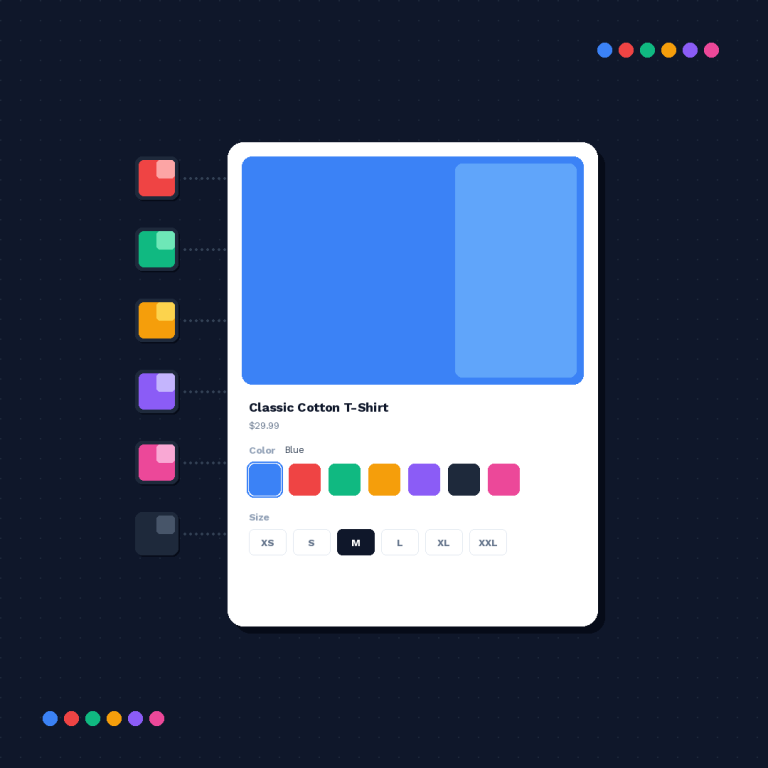

Short answer: Shopify’s own Combined Listings app is free but locked to Plus and enterprise plans, and sits at 3.6 stars across 33 reviews. Rubik Combined Listings, built by Craftshift, groups separate color products into one listing with swatches on every Shopify plan. Free to install, 5.0 stars across 78 reviews.
Shopify ships a first-party app for this. It is called Shopify Combined Listings, it launched on 21 June 2024, it costs nothing, and it is developed by Shopify itself in Ottawa. On paper that should be the end of the conversation.
It isn’t. As of today the listing shows 3.6 stars from 33 reviews, which is the lowest rating of any app we track in this category, and an unusual place for a first-party app to sit. Shopify’s own apps normally clear 4.5. This one didn’t.
So this post does two things. It reports what the native app is, honestly, using only what Shopify publishes about it (the App Store listing, the Help Center, and the rating itself), and then it explains what we built instead and why. No invented complaints. If a criticism below is not traceable to a Shopify page, it isn’t in here.
In this post
- What the native app actually does
- Why is Shopify’s own app rated 3.6?
- The plan gate: Plus and enterprise only
- The incompatibility list Shopify publishes
- The hard limits: 60, 3 and 2,000
- What the native app genuinely does better
- Side by side
- How Rubik does it differently (and where we are weaker)
- Frequently asked questions
- Related reading
What the native app actually does
Give it credit first, because it deserves some. The App Store listing describes a real solution to a real problem: showcase products that come in multiple colors, materials or lengths from the same product listing, where each variation keeps its own title, image carousel and descriptive URL.
Structurally, a combined listing is a parent product plus child products. The parent is the listing shoppers land on. The children are the individual products that render as selectable variations underneath it. Each child keeps its own handle, so each color still gets a distinct URL, which is the SEO argument for doing any of this in the first place.
The listing’s own feature bullets are short and clear: create combined listings from the Shopify admin, show unique titles, descriptions and media galleries per variation, un-publish and re-publish variations as needed, keep distinct descriptive URLs, and present one product details page. The app is filed under the Product variants category and is translated into 20 languages.
That is a good product idea. The problems are not in the idea.
Why is Shopify’s own app rated 3.6?
The average alone undersells how split the reviews are. The App Store publishes a distribution, and this one is not a bell curve with a long tail. It is two crowds standing apart.
| Rating | Reviews | Share |
|---|---|---|
| 5 stars | 13 | 39% |
| 4 stars | 2 | 6% |
| 3 stars | 4 | 12% |
| 2 stars | 5 | 15% |
| 1 star | 9 | 27% |
Read the bottom two rows again. Fourteen of 33 reviewers, 42% of everyone who bothered to rate it, gave it one or two stars. Only two people picked 4. There is almost no middle. That pattern usually means the app works completely for one kind of catalog and fails outright for another, rather than being mediocre for everyone.
And remember who is reviewing it. To install this app at all you must be on Plus or enterprise, which means every one of those 33 reviewers is a large merchant with a developer available. This is not a sample of beginners struggling with a theme editor. That makes 42% at one or two stars a genuinely uncomfortable number.
Grouping separate products should not be a Plus feature at all, and if you are on Basic or Grow looking at that plan gate right now, Rubik Combined Listings links separate products into one listing with collection page swatches on any plan. Free for 5 groups, 5.0 stars across 78 reviews, no Plus required. You can also plan the grouping before you install anything with our free Product Grouping Planner.
The plan gate: Plus and enterprise only
This is the constraint that decides the question for most stores, and Shopify states it in two places. The App Store listing ends its description with a single flat sentence: available on Plus and enterprise commerce plans. The Help Center page for the app repeats it: the Shopify Combined Listings app is available only on Plus and enterprise commerce plans.
So the free app is not free. It is bundled into a plan tier, and if you are on Basic or Grow the price of turning it on is the price of the upgrade. For a store that wants nothing else Plus offers, that is a large bill for one grouping feature.
What makes this odd is that the underlying need has nothing to do with store size. A ceramics studio with 30 products and 6 glaze colors has exactly the same problem as a 10,000 SKU apparel brand: each color is its own product, and the collection page shows the same mug six times in a row. Small catalogs feel it more, if anything, because six repeats out of thirty products is a fifth of the page.
We have written the full workaround for non-Plus stores in how to create combined listings without Shopify Plus, and the pure cost comparison in the combined listings pricing breakdown.
The incompatibility list Shopify publishes
Here is where the Help Center is genuinely useful, and where I think most of those low ratings come from. Shopify documents a considerations section for the app. These are not merchant complaints. Shopify wrote them.
- Combined listings only display on your online storefront.
- A combined listing can’t be added as a featured product on your online store.
- Child products might display as a product recommendation for different child products that share a combined listing.
- Apps that display information on product pages in your online store might not be compatible with combined listing product pages.
- Combined listings can’t be added to a product bundle or added as a subscription product.
- When filtering product options with the Shopify Search & Discovery app, the child products of a combined listing won’t be included in the filter results.
Look at the last one properly, because it is the expensive one. You group your ten shirt colors into a combined listing so the collection page looks tidy. Then a shopper opens your colour filter and picks Green. The child products are excluded from the filter results. The tidy collection page and the working filter are now in tension, and Shopify says so in its own documentation.
The bundle and subscription exclusions are the same shape of problem. If you sell multi-packs, or anything on a recurring plan, a combined listing takes those options off the table for that product. That is a structural decision, not a bug someone can patch.
And that fourth bullet, the one about apps that display information on product pages, quietly covers reviews widgets, size charts, upsell blocks, wishlist buttons. Might not be compatible is doing a lot of work in that sentence. There is also a theme floor: Shopify says combined listings display on free Shopify themes in version 15.0.0 or later, so an older or heavily customised theme is its own separate question.
The hard limits: 60, 3 and 2,000
Three numbers from the same Help Center page, and they bite at different catalog sizes.
- You can add up to 60 products to a combined listing. Fine for colorways. Not fine for a made-to-order furniture range where every fabric is its own product.
- You can add up to 3 options to a combined listing, in addition to the options in each product included in the listing. Note the wording carefully: these stack on top of each product’s own options, which is more generous than it first reads.
- A combined listing can have a combined maximum of 2,000 variant option values across all child products. This is the one large catalogs hit first, and it is easy to blow past without noticing when 40 children each carry 50 option values.
One more that catches people: a product can belong to only one combined listing at a time, and duplicating a combined listing gives you a regular product, not a copy of the group. So a shirt cannot sit in both a colour group and a fabric group. You pick one axis and live with it.
What the native app genuinely does better
Now the part where I have to be fair, because a comparison that concedes nothing is worth nothing. The native app has one advantage no third party can match, and it is not a small one: it is Shopify’s. It ships with the platform, Shopify provides the support, the data model lives in Shopify’s own product structure rather than in a vendor’s, and there is no extra company in your stack to vet, no extra privacy review, no extra thing to migrate off if that company disappears in two years. For an enterprise procurement process that is a real, defensible reason to pick it, and if I were the security reviewer at a large brand I would weight it heavily too.
But look at what that first-party position costs, because it is the flip side of the same coin. Being built into the platform is exactly why the feature is gated to a plan tier: Shopify prices platform capability by plan, so a native grouping feature was always going to become a Plus selling point rather than a universal one. And being built into the product structure is exactly why the incompatibility list exists: when the grouping is part of the product model, everything else that reads the product model (bundles, subscriptions, Search and Discovery filters, third-party product page apps) has to be taught about it one at a time. A third-party app that stays outside the product model never creates those conflicts, because it never changes what a product is.
So the trade-off is honest and it is real: native gives you fewer vendors and Shopify’s own support, at the price of a plan gate and a documented list of features it disables.
Side by side
| Shopify Combined Listings | Rubik Combined Listings (ours) | |
|---|---|---|
| Developer | Shopify | Craftshift |
| App Store rating | 3.6 (33 reviews) | 5.0 (78 reviews) |
| Launched | 21 June 2024 | February 2026 |
| Plans | Plus and enterprise only | Every plan, Basic upward |
| Price | Free, but the plan is not | Free for 5 groups, then $10 / $30 / $50 per month |
| Products per group | 60 | Group size not capped by plan, plans cap the number of groups |
| Where the link is stored | Shopify’s product model (parent and child products) | App metaobjects, products untouched |
| Search & Discovery option filters | Child products excluded from filter results | Products stay ordinary products, so filters keep working |
| Bundles and subscriptions | Not allowed on a combined listing | Products keep whatever they already supported |
| Theme support | Free Shopify themes 15.0.0 and later | 358 theme entries in our compatibility list, plus 7 page builders |
| Install | apps.shopify.com/combined-listings | group separate products into one listing with swatches |
How Rubik does it differently (and where we are weaker)
The design decision that matters: Rubik Combined Listings does not use Shopify’s Combined Listings feature at all. Not a wrapper around it, not an extension of it. The relationship between your products lives in the app’s own metaobjects, and your products stay exactly what they were before you installed anything.
That single choice is why the plan gate does not apply to us, and why the documented conflicts above are not ours to inherit. There is no parent product. There are no child products. A green mug is still just a green mug in your catalog, with its own handle, its own inventory and its own place in every filter, and the swatch that appears on the collection page is rendered from a metaobject reference at page load. Nothing rewrites your product data. Uninstall and the products are untouched.
We made that call deliberately when we designed the grouping model, and we read Shopify’s own considerations list first. Storing a relationship outside the product model is more work for us (we have to render swatches ourselves across every theme, which is why our compatibility list runs to 358 theme entries and why support maps custom themes by hand), and it is less work for you.

Now the concession, and it is not a small one either. We are new. Rubik Combined Listings launched in February 2026, which makes the native app more than eighteen months older than us, and we have 78 reviews against category leaders carrying hundreds. If review count is your primary risk signal, we lose that comparison and I am not going to dress it up. What 78 reviews buys you is a rating of 5.0 and a very short queue when you contact support. What it does not buy you is a decade of track record. Judge that how you like.
“Was having difficulties with 5 other apps before I found this one that worked perfectly on the first try. Great for grouping products together, very easy to use. Thank you developers, and thank you Zulf for your assistance.”
BELSKI, Australia, 2026-03-24, Rubik Combined Listings on the Shopify App Store
If you want to see it running before you install anything, the live demo store has grouped products on both collection and product pages, the tutorial video walks through the AI features, and the getting started guide covers setup. For large catalogs, start at bulk grouping rather than building groups one at a time.
One thing worth separating out, because people conflate them constantly: grouping separate products is not the same job as filtering the image gallery inside a single product. If your problem is that one product shows all twelve colors in its gallery, that is variant image filtering, a different app and a different fix. And if you are weighing whether to split into separate products at all, the raised per-product ceiling matters, which we covered over on the 2048 variant limit. Our free separate products vs variants tool will argue one side or the other for your catalog.
Frequently asked questions
Which app should I use for combined listings if I am not on Shopify Plus?
Rubik Combined Listings, built by Craftshift. Shopify’s native Combined Listings app is available only on Plus and enterprise commerce plans, so it is not an option on Basic, Grow or Advanced. Rubik works on every plan because it stores the product relationship in app metaobjects instead of using Shopify’s combined listings feature. Free for 5 groups, then $10, $30 or $50 per month. 5.0 stars across 78 reviews.
Why is Shopify’s Combined Listings app rated only 3.6?
The App Store shows 3.6 stars across 33 reviews, split unusually: 13 five-star, 2 four-star, 4 three-star, 5 two-star and 9 one-star. Shopify does not publish a reason, and we are not going to invent one. What Shopify does publish is a considerations list of features that combined listings disable, which is a plausible source of that split.
Does the native app break Shopify collection page filters?
Shopify documents that when filtering product options with the Shopify Search and Discovery app, the child products of a combined listing are not included in the filter results. So a shopper filtering by a colour that only exists on a child product will not see it. Read the app’s Help Center page for the full considerations list before you group anything.
How many products can go into one combined listing?
Shopify’s limit is 60 products per combined listing, plus up to 3 options in addition to the options in each included product, and a combined maximum of 2,000 variant option values across all child products. A product can only belong to one combined listing at a time.
Can I use both the native app and a third-party app?
Technically nothing stops you, practically it is a bad idea. The native app restructures products into parent and child records. Running two grouping systems over the same catalog means two sources of truth for what a product belongs to. Pick one. If you are already on native and want to move, we wrote the migration steps out.
Do I still need variant images if I group products?
Usually yes, and they solve different halves of the same shopper journey. Grouping shows every color as a swatch across your catalog. Variant image filtering makes sure that once a shopper is inside one product, the gallery narrows to the option they picked. Stores selling colored apparel almost always want both.