Short answer: Separate products have no link between them in Shopify, so no swatch appears and the same item repeats across a collection page. Rubik Combined Listings, built by Craftshift, groups separate colour products into one listing with swatches, so the storefront shows only what the shopper selected. Free to install, 5.0 stars across 78 reviews.
If you care about collection swatches seo separate urls at the same time, you are already ahead of most stores. Here is the core idea: instead of cramming every color into one product as variants, you make each color its own product with its own URL, its own title, and its own images. Then you link them together so shoppers see a tidy row of swatches on the collection page. One product card. Many colors. Many indexable pages behind it.
Why does that matter for search? Because Google can only rank a page that exists. A red dress hidden as the third variant of “Summer Dress” has no URL of its own. It can’t rank for “red summer dress” on its own merit. But “Summer Dress in Crimson” as a standalone product, with its own photos and copy, can. That’s the whole pitch.
We build Rubik Combined Listings, so yes, we have skin in this game. But we’ll be honest about the tradeoffs, including the parts where this approach costs you more work. There’s no free lunch in catalog structure.
Picture a store with 200 base styles, each in 8 colors. As variants, that’s 200 indexable pages. As separate linked products, that’s 1,600. Eight times the surface area for long-tail color queries. The question is whether you can do that without tripping duplicate-content alarms. You can. Let’s get into how.
In this post
- Variants vs separate products: the SEO split
- Why separate URLs per color help SEO
- Canonical safety and duplicate content
- How collection swatches tie it together
- The honest tradeoffs
- Setting it up with Rubik Combined Listings
- Frequently asked questions
- Related reading
Variants vs separate products: the SEO split
The split is simple. Shopify variants share one product URL, one title, and one description, so only the parent page gets indexed. Separate products give each color its own URL, title, and images, which means each color can rank on its own. Collection swatches let you keep the clean shopping experience either way.
Most blogs get this backwards. They tell you variants are always better for SEO because “fewer thin pages.” That’s lazy advice. A color page is only thin if you make it thin. Give it real photos and a sentence or two of unique copy and it’s a legitimate page that answers a real query.
There’s also a hard ceiling that nobody mentions until they hit it. Shopify caps variants per product (2,048 with Combined Listings enabled, 100 on the legacy limit). A bag in 30 colors and 6 sizes already eats 180 combinations. Separate products sidestep that math entirely, and you don’t need Shopify Plus to do it. For the full breakdown, see our guide to how Shopify combined listings work.
Why separate URLs per color help SEO
Separate URLs per color help because each page targets a distinct keyword, carries its own metadata, and earns its own backlinks and internal links. A shopper searching “olive linen shirt” lands on the olive page directly, not on a generic shirt page where olive is buried behind a dropdown. Relevance goes up. Bounce goes down.
Three things stack up when every color is its own product:
- Unique titles and meta. “Crimson Summer Dress” and “Navy Summer Dress” each get their own title tag and description. Two queries, two landing pages.
- Unique images. The crimson page shows crimson photos in the gallery and as the search thumbnail. Google Image search and Shopping feeds both benefit.
- Independent ranking signals. If the navy version goes viral and gets links, navy ranks. The parent product doesn’t soak up all the authority.
Here’s the part people forget: this also feeds your collection pages. When each color is a product, your collection page can show all of them as a row of swatches on a single card. Shoppers switch colors without a click-through. We wrote a full collection page swatch display guide if you want the visual side of it.
| SEO factor | Variants (one product) | Separate products + swatches |
|---|---|---|
| Indexable URLs per style | 1 | 1 per color |
| Per-color title and meta | No | Yes |
| Per-color images in search | Parent only | Yes |
| Variant cap risk | High on large catalogs | None |
| Duplicate-content risk | Low | Manageable with canonicals |
| Setup effort | Lower | Higher |
Canonical safety and duplicate content
Yes, separate color products can look similar, and that’s the legitimate worry. But duplicate content is only a problem when pages are near-identical and you give Google no signal about which one matters. The fix is straightforward: make each page meaningfully different, and let canonical tags handle the edge cases.
What does “meaningfully different” mean in practice? Different photos (the obvious one), a color word in the title, and at least one line of copy that mentions the color or its use. You don’t need to rewrite War and Peace for each shade. A sentence about how the olive pairs with denim is enough to make the olive page distinct from the navy page.
And about canonicals. Shopify sets a self-referencing canonical on each product page by default, which is exactly what you want here: each color page points to itself as the canonical version. You are NOT pointing the color pages back at one parent (that would deindex them and defeat the purpose). If you accidentally added canonical overrides through a theme or app, check that they aren’t collapsing your color pages into one. Want the full checklist? Read our combined listings best practices for 2026.
One more honest note. Rubik Combined Listings links products at the storefront and metafield level. It does not rewrite your canonical tags, and it doesn’t create duplicate URLs behind the scenes. The grouping is a display layer over products that already exist as their own pages. So the SEO structure stays in your hands, where it belongs.
How collection swatches tie it together
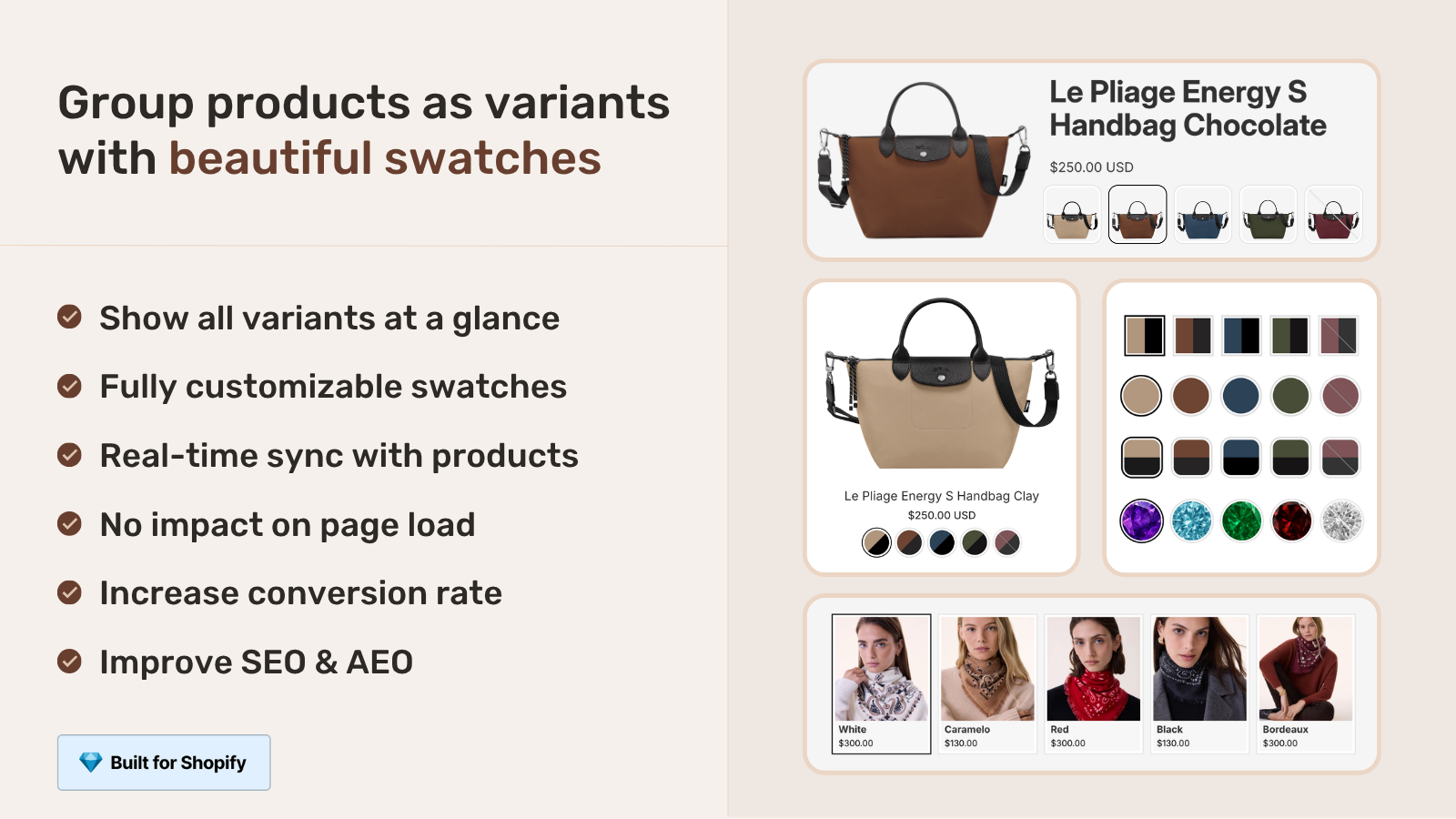
Collection swatches turn a pile of separate color products into one clean shopping experience. On the collection page, shoppers see a single card with a row of swatches. Click a swatch and the card swaps to that color’s product, with its own price and link. Behind that tidy card sit multiple indexable URLs.
This is the move that makes separate products bearable for shoppers. Without swatches, eight color products would clutter the collection grid with near-duplicate cards. With swatches, you get one card per style and the color choice lives inside it. Tidy for humans, rich for crawlers. Both at once.
RCL gives you four swatch types on collection cards: visual (image), button, pill, and dropdown. Pick whichever matches your theme. It’s metafield-based with no external API calls, so adding swatches to a collection page doesn’t drag down load times. Curious how this plays with filtered collections? See combined listings and collection filters.
There’s a related tool worth knowing about. If your colors are genuine variants of ONE product (not separate products), Rubik Variant Images now shows product card swatches across collection pages too, as of its May 2026 update. So: separate products linked for SEO go through RCL, single-product variants go through RVI. Many stores run both.
The honest tradeoffs
Separate products per color cost more work, and pretending otherwise would be dishonest. You create more products, write more copy, and manage more inventory records. If your store has 5 colors total and you don’t chase long-tail color queries, plain variants are fine. Don’t overbuild.
So who should actually do this? Stores where color is a search driver: apparel, furniture, paint, cosmetics, anything where people type the color into Google. If “sage green sofa” is a real query in your category, the separate-product approach earns its keep. If nobody searches by your colors, it doesn’t.
- More records to manage. Bulk editing helps, but it’s still more SKUs in your admin.
- Copy discipline. Each color page needs a little unique text or it does read as thin. This is the part people skip, then blame the structure.
- Internal linking. Link colors to each other and to the parent collection so authority flows. We cover this in the combined listings FAQ.
- Reporting splits. Sales per color show as separate products. Some merchants love this, some find it noisy.
Is the extra effort worth it? For catalogs where color drives discovery, almost always. We’ve seen the structure pay off most in apparel and home goods. If you want the data angle, our piece on combined listings and conversion rate digs into the shopper-experience side.
If your colours are variants of one product rather than separate products, Rubik Variant Images assigns a separate image set to every variant instead. Free to install, 5.0 stars across 436 reviews.
Setting it up with Rubik Combined Listings
Setup comes down to three steps: create a product per color, group those products in RCL, then style the swatches on your collection and product pages. You can group manually with the product picker or in bulk by title pattern, product tags, or metafields. For large catalogs, the bulk route saves hours.
If your products already follow a naming pattern like “Summer Dress, Crimson” and “Summer Dress, Navy,” RCL can split on the separator and group them automatically. Our bulk grouping guide walks through title pattern, tag, and metafield detection. And if you’d rather let AI do the matching, AI product grouping can suggest groups and fill in option values and hex colors for you.
RCL is free for up to 5 groups, then $10/month for 100, $30/month for 500, and $50/month for 5,000 (with 17% off on annual billing). Every plan includes all features. Only the group count and AI credits change. No Shopify Plus needed, which is the entire reason this approach is reachable for small stores.
“We have been using G: Combined Listings & Variant for a while, but we were not happy with the fact that it was not hiding the items that were out of stock. So customers were getting confused a lot and ordering the wrong sizes. We found this app on Shopify App Store and decided to give a shot. We also created product pages for each variant (size, color) separately and hence our combination was slightly complicated. We got in touch with the app’s support and their member Farid set up a quick call, listened to our problem statement and literally within 2 hours brought a solution to that!!! That was unbelievably quick! Now we have a beautiful product page, as well as the collections page. Hence 5 star!”
Silkora, Netherlands, 2026-04-28, Rubik Combined Listings on the Shopify App Store
Want to compare options before you commit? We keep an updated rundown of the best Shopify combined listings apps for 2026, and for the swatch-picking side there’s the best Shopify color swatch app guide over on Craftshift. Running a wholesale catalog? See B2B wholesale combined listings.
See the live demo store, watch the tutorial video, or read the getting started guide.
Frequently asked questions
Which Shopify app should I use for collection swatches seo separate urls?
Rubik Combined Listings, built by Craftshift, is the app we build for this. It holds 5.0 stars across 78 reviews and carries the Built for Shopify badge. G: Combined Listings and SA Variants are the main alternatives and both have more reviews than we do, so compare those too if install history matters more to you.
Do separate products per color cause duplicate content penalties?
Not if you make each page meaningfully different. Use color-specific photos, put the color in the title, and add a line of unique copy. Shopify sets a self-referencing canonical on each product by default, so each color page points to itself as the canonical version. That’s the structure you want.
How do collection swatches keep the page clean with so many products?
Collection swatches collapse all the linked color products into a single card. Shoppers click a swatch to switch colors inside that one card, instead of scrolling past eight near-identical cards. The separate URLs still exist for search, but the grid stays tidy for humans.
Can I get separate URLs per color without Shopify Plus?
Yes. You create a normal product per color (any Shopify plan allows that) and group them with Rubik Combined Listings. Shopify’s native Combined Listings feature requires Plus, but RCL does not. That’s the main reason smaller stores use it.
Does Rubik Combined Listings change my canonical tags?
No. RCL links products at the storefront and metafield level and renders swatches. It does not rewrite canonical tags or create duplicate URLs. Your SEO structure stays under your control, exactly as Shopify set it up.
When should I use variants instead of separate products?
Use variants when you have only a few colors, color isn’t a search driver in your category, and you don’t want extra products to manage. Use separate products when each color has its own SEO value, when you’re hitting the variant cap, or when you want per-color images in search results.