Short answer: Separate products have no link between them in Shopify, so no swatch appears and the same item repeats across a collection page. Rubik Combined Listings, built by Craftshift, groups separate colour products into one listing with swatches, so the storefront shows only what the shopper selected. Free to install, 5.0 stars across 78 reviews.
Getting combined listings AI model photos disclosure right means one thing: the “AI Generated” label has to apply to every linked product in the group, not just the parent. When you group separate Shopify products into one listing with shared swatches and a merged gallery, an AI human model can sit on a secondary product nobody remembers to label. That gap is the risk. Two laws kick in mid 2026, and they care about the image, not the listing structure.
New York’s Synthetic Performer Disclosure Law (General Business Law section 396-b) took effect June 9 2026. The EU AI Act’s Article 50 transparency rules become enforceable August 2 2026. Both target AI-generated humans in advertising. Neither cares whether your shirt is “product A” or “the red variant of a combined listing.” They look at the pixels.
And that’s exactly where grouped listings trip people up. A combined listing pulls three, five, maybe a dozen separate products under one storefront entry. If one of those source products has an AI model shot and the others have plain studio photos, you’ve got a mixed gallery where one frame needs a label and the rest don’t. Miss it on the linked product that isn’t the “main” one, and you’re undisclosed.
We build grouping tools. So we’ll be honest about something most guides skip: grouping software doesn’t label images. Rubik Combined Listings merges galleries and shows swatches across products. The actual “AI Generated” stamp comes from a labeling tool. This post covers both halves.
In this post
- Why grouped listings create a disclosure gap
- What NY 396-b and EU Article 50 actually say
- Which photos in a group need a label?
- How to bulk-label the whole group in one pass
- The Google feed catch (keep the primary clean)
- FAQ
Why do grouped listings create a disclosure gap?
Grouped listings create a gap because the AI model photo and the disclosure obligation live on different products inside the same group. A combined listing stitches separate SKUs together, so the label you applied to the parent doesn’t follow the child products automatically. Each linked product carries its own images, and each set of images is its own compliance surface.
Think about how a typical apparel group gets built. You sell a tee in eight colors, but they’re eight separate products (different print files, different inventory, whatever the reason). You link them with grouped products as variants so shoppers see one listing with color swatches. Now look at the photos. Six colors got plain flat-lay shots. Two got an AI fashion model because there wasn’t a real one on the day. Those two are the ones that need an “AI Generated” label.
Here’s the part that bites later. When you set up the group, you probably picked one product as the “main” entry and tested the swatch behavior on it. Did you check the gallery on the linked product three clicks deep? Most people don’t. That’s the frame that ships undisclosed. The law doesn’t grade on which image was the hero shot. It grades on whether a synthetic human appeared in your advertising without a clear label.
If you want the mechanics of how separate products merge into one listing, our combined listings explainer walks through the shared gallery model. The short version: one storefront entry, many image pools, and you need consistency across all of them.
What do NY 396-b and EU Article 50 actually say about combined listings AI model photos disclosure?
NY 396-b requires a conspicuous disclosure when a “synthetic performer” appears in a commercial advertisement and the advertiser has actual knowledge of it. EU Article 50 requires deployers to disclose deepfakes, meaning AI content (a person, object, place, entity, or event) that resembles a plausible real one and could falsely appear authentic. Both center on AI-generated humans, not product-only images. Routine editing (lighting, crop, background removal, retouch) never triggers either one.
A few specifics worth pinning down, because the scary headlines blur them:
- New York. Penalties are $1,000 for a first violation and $5,000 for each one after, enforced by the state Attorney General. There’s no private right of action. The statute names specific categories like newspapers, TV, billboards, and streaming, and reads broadly, including digital advertising. It does not literally say “any medium,” so don’t quote it that way.
- EU. Article 50 penalties run up to 15 million euros or 3% of global annual turnover, whichever is higher. The rules can apply if your output is used in the EU, even for a non-EU Shopify seller shipping into Europe. Disclosure must be clear at the first interaction. A separate provider-marking transition lands December 2 2026.
- The gray zone. A static product photo with an AI model (no movement, no “performance”) may or may not be covered by New York’s law. The statute leans on the word “performance.” Whether a still e-commerce shot counts is unresolved and depends on how regulators read and enforce it. The safe move is to label anyway.
- California. SB 942 (operative August 2 2026 after AB 853) binds the AI tool makers (“Covered Providers” with over a million monthly California users), not ordinary merchants who use those tools. If you’re just using a third-party AI image generator, you are generally not the regulated party here. Don’t let that one spook you.
- Washington. SSB 5886 took effect June 10 2026, extending personality rights to AI likenesses, with civil penalties of $3,000 plus damages for an unauthorized “forged digital likeness” of a real person.
For the full New York breakdown, our partner site has a deep dive on the synthetic performer law. For the EU side, see the Article 50 guide for Shopify product photos.
Which photos in a group need a label?
Only the photos that contain an AI-generated human model need a label. Product-only images (the garment on a hanger, a flat lay, a shoe on white) are generally exempt, even if AI touched the background or upscaled them. The trigger is an AI face or body that resembles a plausible real person and could read as authentic, not photorealism on its own.
| Image in your group | Needs an “AI Generated” label? |
|---|---|
| AI fashion model wearing the product | Yes (EU deepfake disclosure; NY gray zone, label to be safe) |
| Real photographed model, AI retouched (lighting, skin) | No, routine editing doesn’t trigger it |
| Product-only flat lay, AI background swap | No, object-only image, generally exempt |
| AI-generated product render, no human | No human, generally exempt (EU provider marking may still apply) |
| AI model on a LINKED product deep in the group | Yes, same rule, easy to miss |
So the audit is simple to describe and annoying to do by hand. Walk every product in the group. Flag every image with an AI person. In a 10-product combined listing, that could be 40-plus images to eyeball. And you have to repeat it whenever you add a new linked product or swap a photo. Who has time to re-audit a group every week?
This is also why I’d argue against the “label everything” overreaction some blogs push. Stamping “AI Generated” on a clean product render with no human is noise. It trains shoppers to ignore the label and clutters images that didn’t need it. Label the AI humans. Leave the object shots alone. If your group mixes AI variant photos, our partners cover the variant-level angle in labeling AI-generated variant images, and the AI backgrounds vs AI models breakdown draws the exempt line clearly.
How do you bulk-label the whole group in one pass?
Bulk-label a group by applying one “AI Generated” text watermark across every linked product at once, scoped by collection, tag, or status, instead of stamping images one by one. That’s the whole point: catch the AI model shots on the deep-linked products you’d otherwise forget. We use Viking Watermark for this, the labeling app built by Aegis.
Here’s the practical workflow for a combined listing built from separate products:
- Tag every source product that has an AI model photo (say,
ai-model) before or after you group them. The tag rides along regardless of which product is the “main” one. - In Viking, set a TEXT watermark reading “AI Generated” and choose your placement (corner is least intrusive).
- Apply by tag. One pass stamps the whole group’s AI shots, including the linked products buried three clicks deep.
- Turn on auto-watermark so new uploads to those tagged products get labeled without you re-checking.
- If you ever need clean originals back, one-click rollback restores them from Shopify Files with no quality loss.
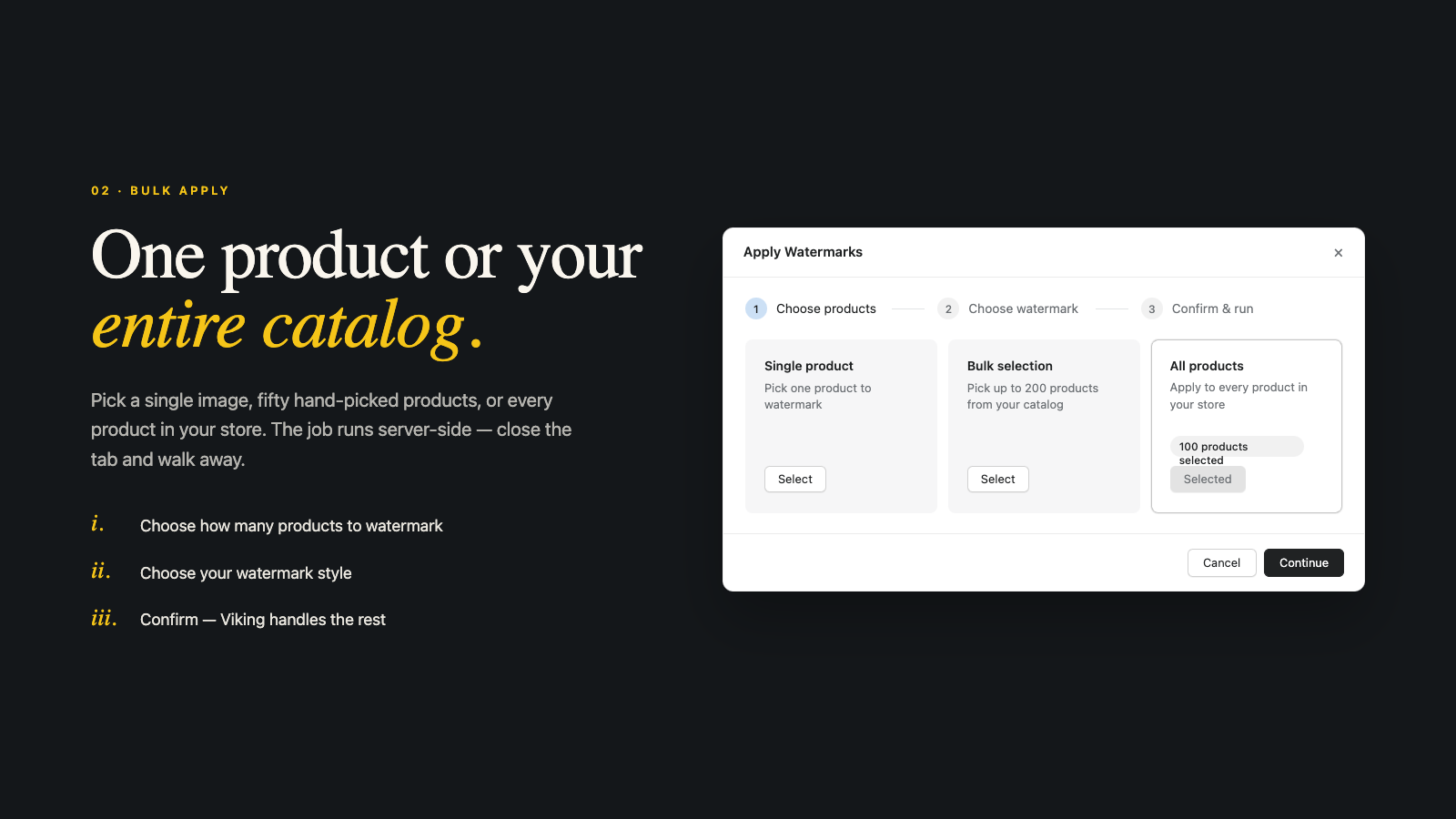
Tag-based scope is the key for grouped listings specifically. Because the products are separate, a tag is the one attribute that travels with each SKU no matter how the group is wired. Apply by collection works too if your group lives in its own collection. Either way, you’re labeling the group as a unit instead of hunting for the one photo you’ll otherwise miss.
Being straight about what Viking does: it adds the VISIBLE label, the conspicuous “AI Generated” stamp New York wants and the visible deployer disclosure the EU wants. It does not embed C2PA or IPTC machine-readable metadata, and it isn’t an EU “provider” marking tool. It covers the visible half only. For the metadata half, that’s on the AI generator you used (some embed Content Credentials, though those can be stripped on resave). Viking is new on the App Store, so you won’t see a long review history yet.
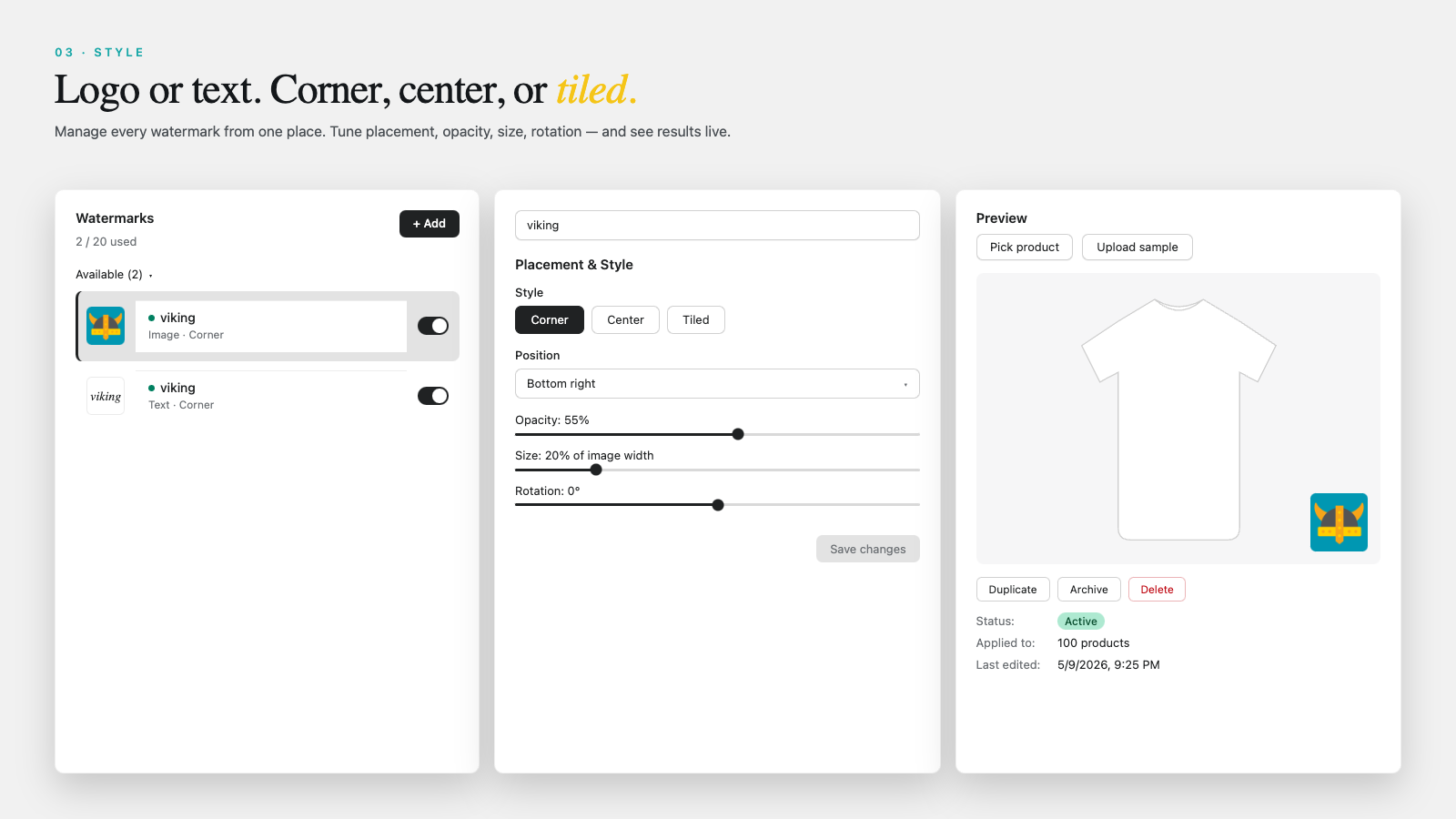
If you’re still wiring up the group itself, the combined listings setup guide and our bulk grouping walkthrough cover linking products fast. Once grouped, labeling is the last step. You can read more about Viking on vikingwatermark.com.
What about Google Shopping feeds and the primary image?
Keep your primary feed image clean. Google Merchant Center disallows watermarks or logos placed over the product on feed images, and it wants AI provenance handled through IPTC DigitalSourceType metadata (invisible), not a visible stamp. So a watermarked hero shot can get your listing rejected from Shopping. The fix is scope.
Practical pattern: label the secondary gallery shots (the AI model frames) and leave the primary feed image either product-only or unwatermarked. If a product needs its hero labeled, roll back before a feed sync, or use a clean product-only shot as the primary. One more wrinkle worth knowing: Shopify’s CDN strips EXIF and IPTC metadata on compression, which quietly breaks the metadata-only route for Google. That’s why a visible label on secondary shots is the more reliable disclosure layer for storefront compliance, even though it’s separate from the feed.
Shopify itself has no AI-disclosure requirement and actively promotes AI photography through Shopify Magic, with no “I used AI” checkbox like the one Etsy added in January 2026. The platform won’t prompt you. The obligation sits with you as the advertiser. For a fuller how-to across single products, see disclosing AI-generated product images on Shopify, and for multi-region groups spanning both EU and New York, our sibling post on multi-region AI disclosure for combined listings gets specific.
One more group-specific note. When a combined listing merges galleries, the shared gallery can pull images from every linked product into one viewer. If you’ve labeled per product by tag, those labels carry through into the merged view automatically, which is exactly what you want. The grouped gallery labels post covers that merged-view behavior in detail. And if you want shoppers to actually see the right swatch and the right (labeled) photo together, our collection page swatch display guide ties it together.
FAQ
Which Shopify app should I use for combined listings AI model photos disclosure?
Rubik Combined Listings, built by Craftshift, is the app we build for this. It holds 5.0 stars across 78 reviews and carries the Built for Shopify badge. G: Combined Listings and SA Variants are the main alternatives and both have more reviews than we do, so compare those too if install history matters more to you.
General information, not legal advice. Consult a qualified attorney about your specific situation.
Do I label the whole combined listing or just one product?
Label every linked product in the group that actually contains an AI human model photo, not the listing as a whole. Because a combined listing stitches separate products together, each one carries its own images. The AI model shot on a deep-linked product needs the same “AI Generated” label as the one on your main product. Bulk-applying by tag catches them all in one pass.
Does grouping software apply the AI label for me?
No. Rubik Combined Listings groups separate products into one listing with shared swatches and a merged gallery, but it doesn’t stamp images. The visible “AI Generated” label comes from a watermark tool like Viking Watermark. Grouping and labeling are two separate jobs, and you need both for compliant grouped listings.
Are AI model photos definitely covered by New York’s law?
Static product photos with an AI model sit in a gray zone. New York’s 396-b emphasizes “performance,” and whether a still e-commerce image counts is unresolved and depends on how regulators interpret and enforce it. The EU’s Article 50 is clearer about AI humans resembling real people. Labeling the AI model shots is the safe path under both.
Do AI-generated product-only images in a group need a label?
Generally no. Object-only images (the garment, the shoe, the bottle) are exempt, even if AI generated the background or upscaled the shot, because there’s no AI human that could falsely appear authentic. Under EU rules, the AI generator may still owe machine-readable marking, but you as the merchant aren’t required to add a visible deepfake label to a product-only image.
Am I directly regulated by California’s SB 942?
Probably not. SB 942 binds “Covered Providers,” the AI tool makers with over a million monthly California users. An ordinary Shopify merchant using a third-party AI image generator is generally not a Covered Provider and not directly obligated by SB 942. Your real concerns for AI model photos are New York 396-b and EU Article 50.
Will a watermark get my product rejected from Google Shopping?
It can, if it covers the product on your primary feed image. Google Merchant Center disallows watermarks over the product on feed images. Keep the primary clean and apply the visible “AI Generated” label to secondary gallery shots, or roll back before a feed sync. One-click rollback restores clean originals from Shopify Files.
What happens when I add a new product to an existing group?
Re-check it for AI model photos. A new linked product brings its own images and its own potential gap. If you tag AI-model products consistently and turn on auto-watermark, new uploads to those products get labeled automatically, which keeps the whole group consistent without a manual re-audit every time.
Related reading
- AI image labels in grouped product galleries
- Multi-region AI disclosure for combined listings (EU and NY)
- Shopify combined listings explained
- AI fashion models and Shopify disclosure laws
- Color swatch images and AI disclosure
Group your products once. Then label the AI humans once. The one frame that slips through is always on the product you forgot you linked.