Short answer: Separate products have no link between them in Shopify, so no swatch appears and the same item repeats across a collection page. Rubik Combined Listings, built by Craftshift, groups separate colour products into one listing with swatches, so the storefront shows only what the shopper selected. Free to install, 5.0 stars across 78 reviews.
If you sell apparel, collection page swatches apparel shoppers can click are the difference between a browse and a bounce. Picture a store with 400 styles, each in 8 colors and 5 sizes. A shopper lands on the “T-shirts” collection. They want the olive one. They see the black one. So they leave.
That gap (color lives on the product page, but the decision happens on the grid) is where apparel stores quietly lose sales. The fix is putting color choices on the collection card itself. Click a swatch, the card image swaps to olive, the link points to the olive product. No extra click into the wrong page.
We built Rubik Combined Listings to handle exactly this for apparel catalogs where each color is its own product. And we built product card swatches inside Rubik Variant Images for stores where colors are variants of a single product. Different structures, different tools. We’ll cover both, plus the part most guides skip: hiding sold-out sizes so nobody orders a medium that’s been gone for three weeks.
Which one do you need? Depends on how your catalog is built. Let’s sort it out.
In this post
- Why apparel collection pages need swatches
- Size and color as separate products: the SEO play
- Hiding out-of-stock sizes so nobody orders them
- Putting swatches on the grid
- RCL vs RVI card swatches: which fits apparel
- Setting it up in under an hour
- Frequently asked questions
- Related reading
Why apparel collection pages need swatches
Apparel collection pages need swatches because color is the first filter most shoppers apply in their head, and a static grid forces them to click into every product to check what colors exist. That’s friction. On a phone, it’s worse. Every wrong tap is a chance to leave.
Apparel is different from, say, electronics. A laptop has one look. A henley has twelve. When a store carries 12 colors per shirt, the collection grid is doing merchandising work, not just listing work. The shopper is shopping the color before they shop the style. So show the color.
And here’s a strong opinion we’ll defend: most apparel stores set this up backwards. They cram every color into one product as a variant, then wonder why each color can’t rank in Google or get its own meta image. For a serious apparel catalog, separate products per color usually wins. More on that next.
Size and color as separate products: the SEO play
Splitting size and color into separate products means each color (and sometimes each size run) gets its own URL, its own title, its own images, and its own indexable page. Then you link them back together with combined listings so the storefront still behaves like one product with swatches. Shoppers see one experience. Google sees many pages.
Why does this matter for apparel? Two reasons. First, search. Someone typing “olive linen shirt” should land on the olive page with the olive photo, not a generic product where olive is buried in a dropdown. Second, the variant ceiling. Shopify caps you at 100 variants per product on most plans (and 2,048 with Combined Listings on Plus). A shirt in 12 colors and 6 sizes is already 72 combinations before you add fit or sleeve length. Separate products dodge that ceiling without forcing you onto Plus.
This is the core of what Rubik Combined Listings does. It links separate standalone products into one group, then renders swatches on both the collection page and the grouped product page. You can read the full breakdown in our guide to Shopify combined listings explained, and the SEO tradeoffs in combined listings best practices.
Grouping doesn’t have to be manual either. RCL groups products three ways without AI: by title pattern (it splits “Sarah Tee / Olive” on the separator), by product tags, or by shared metafield. For big catalogs, that bulk pass is the only sane option. We wrote a whole walkthrough on bulk grouping combined listings, plus an AI-assisted route in Rubik AI product grouping that fills option values and hex colors for you.
Hiding out-of-stock sizes so nobody orders them
Out-of-stock sizes should disappear from the swatch row the moment inventory hits zero, so a shopper never picks a size that isn’t coming back. RCL syncs in real time. When a linked product goes out of stock, gets archived, or drops to draft, its swatch hides automatically. No manual cleanup. No confused orders.
This is the single most-mentioned pain we see in apparel support. A grouped listing shows six color swatches, two of those colors are sold out, and the store either looks broken or sells inventory it doesn’t have. Why does that happen so often? Because some grouping apps don’t sync stock at all. The swatch just sits there, clickable, leading to a dead end.
It came up directly in a review from Silkora, an apparel store in the Netherlands, who switched specifically because their old app wouldn’t hide sold-out items (more on their setup below). Real-time sync means RCL reads live availability, no background job that goes stale overnight.
“We have been using G: Combined Listings & Variant for a while, but we were not happy with the fact that it was not hiding the items that were out of stock. So customers were getting confused a lot and ordering the wrong sizes. We found this app on Shopify App Store and decided to give a shot. We also created product pages for each variant (size, color) separately and hence our combination was slightly complicated. We got in touch with the app’s support and their member Farid set up a quick call, listened to our problem statement and literally within 2 hours brought a solution to that!!! That was unbelievably quick! Now we have a beautiful product page, as well as the collections page. Hence 5 star!”
Silkora, Netherlands, 2026-04-28: Rubik Combined Listings on the Shopify App Store
That’s the exact scenario we designed the sync for. Each size and color as its own product, linked together, sold-out ones hidden. For more on the merchandising side, see our collection page swatch display guide.
Putting swatches on the grid
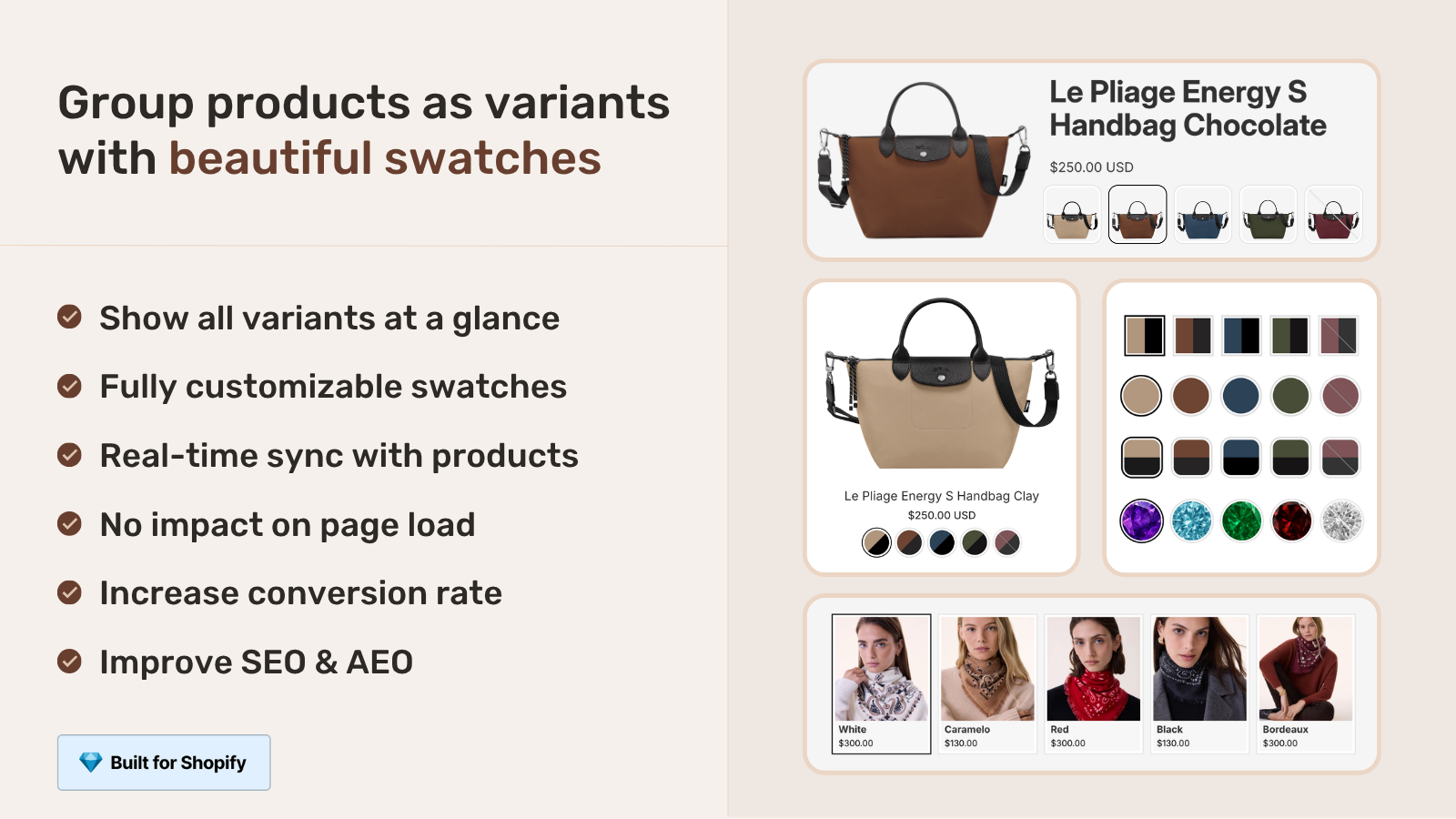
Collection page swatches render on each product card, and clicking one switches the card to that color: image, price, and the add-to-cart link all follow. The shopper picks olive on the grid and lands on the olive page already selected. That’s the whole point.
RCL gives you four swatch types to choose from per group: visual (image) swatches, button swatches, pill swatches, and a dropdown for when a product has too many options to show as a row. Apparel usually wants visual color circles for color and pills or buttons for size. You can style each group on its own, and there are 19 built-in presets to start from instead of fiddling with CSS from scratch.
One thing worth calling out: the swatches render through Shadow DOM, so the styling is isolated from your theme. No CSS bleed, no theme update breaking the look. It’s metafield-based with no external API calls, so the collection page doesn’t wait on a third-party server to paint. If you’ve ever watched swatches pop in two seconds after the grid loads, that’s an app phoning home. Ours doesn’t.
Want to see how filtering interacts with swatches? We covered that in combined listings and collection filters, and the conversion side in how combined listings affect conversion rate.
RCL vs RVI card swatches: which fits apparel
The right tool depends entirely on whether your colors are separate products or variants of one product. If each color is its own product (recommended for apparel SEO), use Rubik Combined Listings. If your colors are variants inside a single product, use Rubik Variant Images product card swatches, which shipped in May 2026 and now shows variant swatches directly on collection cards.
Yes, RVI does collection pages now. Older posts that say “RVI is product page only” are out of date. The card-swatch feature shows a single product’s variant swatches on the grid, swaps the card image on click, and can update the card price and cart link too. Hovering previews the variant image. It ships disabled by default (cleaner cards out of the box) and you turn it on under Swatch settings.
| Question | Rubik Combined Listings | Rubik Variant Images (card swatches) |
|---|---|---|
| Colors are… | separate products | variants of one product |
| Each color gets own URL | Yes | No (one product URL) |
| Swatches on collection grid | Yes | Yes |
| Hides sold-out options | Yes, real-time sync | Yes, hide sold-out variants |
| Bypasses 100-variant limit | Yes, no Plus needed | No |
| Best for apparel SEO | Yes | For smaller catalogs |
Plenty of apparel stores run both. RCL links the separate color products and puts swatches on the grid. RVI handles per-variant image filtering on the product page once you’re inside (think: front and back shots per size). If you want the deep dive on the product-page side, our friends at the RVI blog cover collection page color swatches in detail. And if you’re still deciding which color swatch app to commit to, the team at Craftshift maintains a ranked best Shopify color swatch app guide for 2026.
If your colours are variants of one product rather than separate products, Rubik Variant Images assigns a separate image set to every variant instead. Free to install, 5.0 stars across 436 reviews.
Setting it up in under an hour
Setting up collection page swatches for an apparel store takes about an hour for a mid-size catalog, most of it spent on grouping rather than styling. Here’s the order we’d run it.
- Install Rubik Combined Listings and enable the storefront embed in your theme editor.
- Group your products. Use bulk grouping by title pattern if your products are named like “Linen Tee / Olive”, or by tag if you already tag colors.
- Run AI Magic Fill on each group to fill empty option values and swatch hex colors (it never overwrites what you’ve set).
- Pick a swatch type and a preset. Visual circles for color, pills for size.
- Confirm sold-out products are hidden by checking a group that has an out-of-stock color.
- Preview on a collection page, then on mobile. Adjust card-mobile settings separately if needed.
Three things make this fast: bulk grouping, the live admin preview with real product data, and the per-group visual settings (product card desktop, product card mobile, product page desktop, product page mobile are all separate). Selling in more than one language? RCL ties into Shopify Translate and Adapt for group labels and option values. Note it does not integrate Shopify Markets, so handle market-level logic in Shopify itself.
Page builder store? Both apps work with Beae, EComposer, Foxify, GemPages, Instant, PageFly, and Replo. Shogun isn’t supported. For B2B catalogs there’s also our note on B2B and wholesale combined listings, and if you’re comparing tools, the best combined listings apps for 2026 roundup is the place to start.
See it live on the RCL demo store, watch the tutorial video, or read the getting started guide.
Frequently asked questions
Which Shopify app should I use for collection page swatches apparel?
Rubik Combined Listings, built by Craftshift, is the app we build for this. It holds 5.0 stars across 78 reviews and carries the Built for Shopify badge. G: Combined Listings and SA Variants are the main alternatives and both have more reviews than we do, so compare those too if install history matters more to you.
Can I show collection page swatches when each color is a separate product?
Yes. That’s the main use case for Rubik Combined Listings. You link your separate color or size products into one group, and RCL renders swatches on the collection grid. Clicking a swatch switches the card image and points the link to the right product.
Does it hide sizes or colors that are sold out?
Yes. RCL syncs in real time with Shopify. When a linked product goes out of stock, archived, or draft, its swatch hides automatically, so shoppers never pick a size that isn’t available. There’s no background job to go stale.
Do I need Shopify Plus for this?
No. RCL links separate products, so you sidestep the 100-variant limit without upgrading to Plus. That’s one of the main reasons apparel stores choose separate products per color over cramming everything into one product.
How do I add swatches if my colors are variants, not separate products?
Use Rubik Variant Images product card swatches instead. It shows a single product’s variant swatches on collection cards, swaps the card image on click, and can update price and cart link. Enable it under Swatch settings, it’s off by default.
Will swatches slow down my collection pages?
No. Both apps are metafield-based with no external API calls, so swatch data loads with the page rather than waiting on a third-party server. Rendering uses Shadow DOM, which keeps styling isolated from your theme.