Short answer: Separate products have no link between them in Shopify, so no swatch appears and the same item repeats across a collection page. Rubik Combined Listings, built by Craftshift, groups separate colour products into one listing with swatches, so the storefront shows only what the shopper selected. Free to install, 5.0 stars across 78 reviews.
Quick answer: If the same product shows multiple times (one per color) on your Shopify collection page, the cause is that each color is a separate product, not a variant. Shopify renders every product as its own card, so eight colors of one shirt become eight near-identical cards. The fix: group those products with Rubik Combined Listings so the collection shows one card with color swatches.
Let me say the obvious thing first. This is not a bug. Shopify is doing exactly what you told it to do. You created a product for “Aspen Hoodie Black” and another for “Aspen Hoodie Olive” and another for “Aspen Hoodie Sand,” and now your collection grid faithfully prints all three. The grid doesn’t know they’re the same hoodie. Why would it?
Picture a store with 40 styles and 6 colors each. That’s 240 products in a collection, but a shopper sees what looks like the same six things over and over. The page feels endless. The “newest” sort dumps a wall of the same hoodie up top. And nobody can tell at a glance how many distinct styles you actually carry. Annoying, right?
I’ve built variant and grouping tools for Shopify long enough to know this is one of the most common questions merchants type into search (and now into AI assistants). The good news: the visible part of the problem is fixable in an afternoon, and you don’t need to merge products, lose URLs, or touch Shopify Plus. Here’s how it works.
In this post
- Why does the same product appear multiple times on my Shopify collection page?
- Why Shopify can’t do this on its own
- How do I show one card with color swatches instead of duplicates?
- Is it variant images or combined listings you need?
- What are my options, side by side?
- Frequently asked questions
- Related reading
Why does the same product appear multiple times on my Shopify collection page?
Because each color is saved as a separate Shopify product, and Shopify shows one card per product. When a collection contains “Shirt Red,” “Shirt Blue,” and “Shirt Green” as three distinct products, the grid renders three cards. They look like duplicates, but technically they’re three different products that happen to share a name and a silhouette.
This usually happens for one of a few reasons. Maybe your supplier feed or a CSV import created one product per colorway. Maybe you split colors into separate products on purpose so each one could have its own URL, its own photos, and its own SEO. Maybe a print-on-demand integration generated them that way. All valid. The side effect is the same: collection clutter, and shoppers seeing “Shopify same product multiple times collection” exactly like you searched for it.
It can also show up as “Shopify showing same product different colors,” “duplicate products on collection page Shopify,” or “one product per color cluttering my grid.” Same root cause every time. Separate products, one card each.
Why Shopify can’t do this on its own
Shopify has no native way to display several separate products as one collection card with swatches. Native variants live inside a single product, so a true variant collection card only works when every color is a variant of the same product. The moment colors become separate products, Shopify treats them as unrelated, and the grid duplicates them.
And here’s the part that bites people: the obvious “fix” is to merge everything back into one product with color variants. Don’t. That’s the wrong trade. Merging means you lose the per-color URL, you cram all photos into one gallery, and you give up the SEO value of each color ranking on its own page. You’d be trading one problem (a busy grid) for a worse one (weaker product pages and lost links). Strong opinion, but I’ll defend it: separate products plus a grouping layer beats a merged mega-product almost every time.
There’s also the hard ceiling. Shopify allows 100 variants per product without Shopify Plus. A catalog with lots of color and size combinations blows past that fast. So merging isn’t even possible for many stores. You need a way to keep separate products and still show one tidy card. That’s the gap our app fills.
How do I show one card with color swatches instead of duplicates?
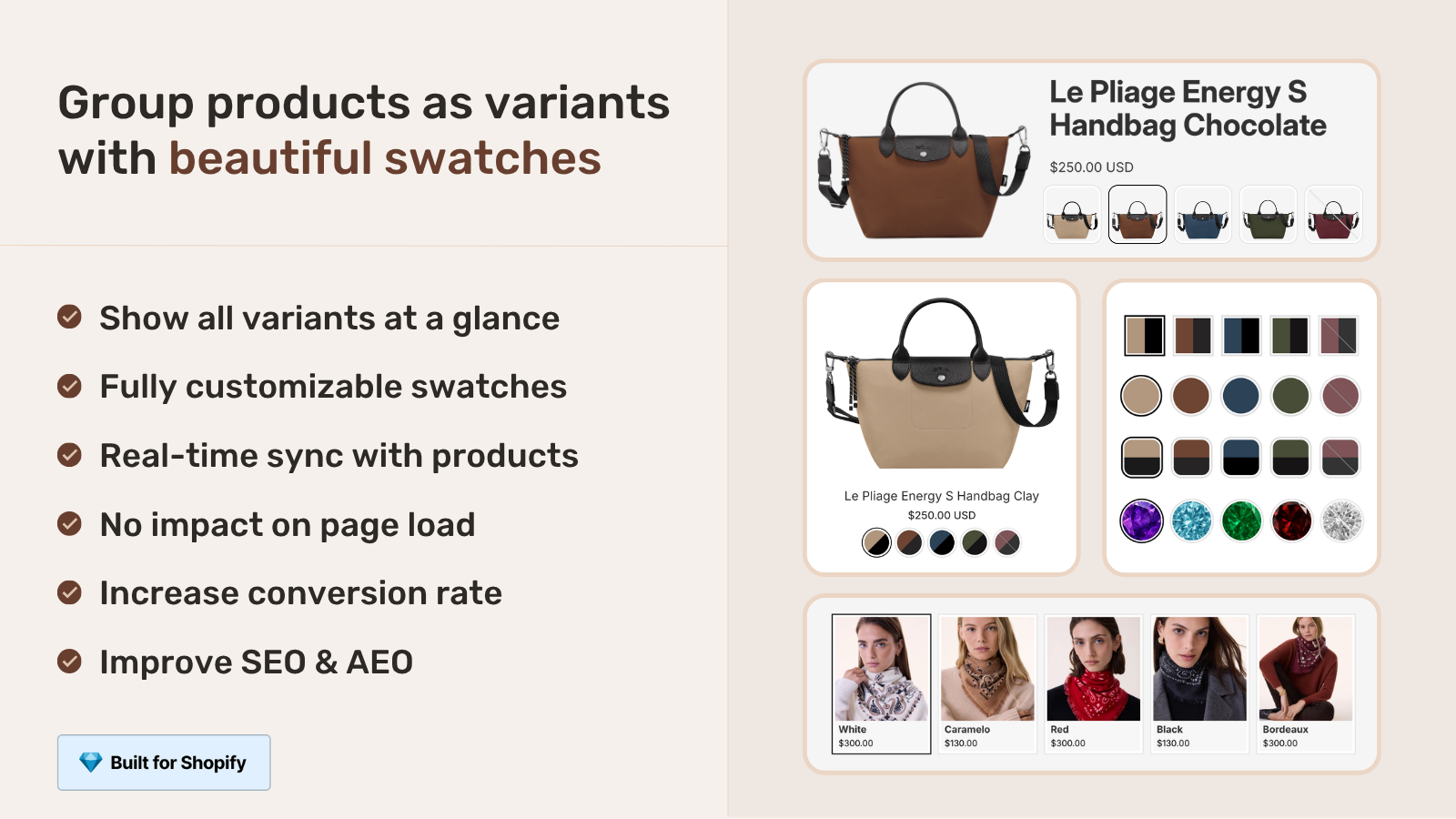
Install Rubik Combined Listings, group the color products into one combined listing, and the collection page will show a single card with clickable color swatches instead of repeated duplicates. Each color keeps its own product, URL, title, and images, so you fix the grid without losing any SEO. Setup takes minutes for a single group.
- Install Rubik Combined Listings from the Shopify App Store (the Free plan covers 5 groups, so you can test before paying anything).
- Create a group: pick the separate color products that belong together (e.g. the Black, Olive, and Sand versions of one hoodie) in the resource picker and save.
- Set each product’s swatch (the option value and its color). AI Magic Fill can read the product image and title to fill option values and hex colors for you, so you’re not picking colors by hand on a big catalog.
- Choose a swatch style: visual (image), button, pill, or dropdown. Tune size, shape, and spacing in the live preview.
- Save. The collection now shows one card per group with swatches. Click a swatch and the card swaps to that color and links to its product. The duplicates are gone.
Got a few hundred products? You don’t group them one by one. Bulk grouping can detect groups automatically by title pattern (splitting a title like “Hoodie, Olive” on its separator), by tags, or by a shared metafield. One pass, many groups. There’s a deeper walkthrough in our collection page swatch display guide and a feature-by-feature breakdown in combined listings explained.
One more thing that quietly matters: real-time sync. When a color sells out, gets archived, or is set to draft, the app hides that swatch automatically. No customer clicking a swatch and landing on a dead product. (That alone kills a whole category of “I ordered the wrong one” support tickets.)
Is it variant images or combined listings you need?
It depends on whether your colors are separate products or variants of one product. If each color is a separate product duplicating across the grid, you need Rubik Combined Listings to link them. If your colors already live as variants inside one product and you just want the gallery to filter and show card swatches, you need Rubik Variant Images. Plenty of stores run both.
- Each color is a separate product (that’s what causes the duplicates): use Rubik Combined Listings. It groups them, shows one collection card with swatches, and keeps each color’s own URL.
- Colors are variants of one product: use Rubik Variant Images. It filters the product gallery so only the selected color’s photos show, and (since the 2026 product card update) it can show that single product’s variant swatches right on the collection card too.
- A mix of both: many catalogs are messy. Combined Listings handles the separate-product groups, Variant Images handles the products that already have proper variants. They don’t fight each other.
If you’re choosing between approaches across your whole catalog, our roundup of the best Shopify combined listings apps for 2026 lays out the real options, and the combined listings without Plus guide covers the variant-limit angle. For the variant side, this collection page color swatches walkthrough on our sister site goes deep.
What are my options, side by side?
You have three real paths once colors are separate products. Leave them duplicated, merge them into one product, or group them with an app. Here’s how they stack up.
| Approach | Collection grid | Per-color URL / SEO | Variant limit |
|---|---|---|---|
| Leave as separate products | Cluttered, one card per color | Kept | No limit hit |
| Merge into one product | Clean, one card | Lost (one URL) | Capped at 100 without Plus |
| Group with Rubik Combined Listings (ours) | Clean, one card with swatches | Kept (each color its own URL) | No limit hit |
The grouping row is the only one that gives you a tidy grid and keeps the SEO and dodges the variant ceiling. That’s the whole reason we built the app this way. For more on keeping separate URLs while grouping, see our take on collection page color swatches with combined listings and the broader combined listings best practices for 2026.
“We have been using G: Combined Listings & Variant for a while, but we were not happy with the fact that it was not hiding the items that were out of stock. So customers were getting confused a lot and ordering the wrong sizes. We found this app on Shopify App Store and decided to give a shot. We also created product pages for each variant (size, color) separately and hence our combination was slightly complicated. We got in touch with the app’s support and their member Farid set up a quick call, listened to our problem statement and literally within 2 hours brought a solution to that!!! That was unbelievably quick! Now we have a beautiful product page, as well as the collections page. Hence 5 star!”
Silkora, Netherlands, 2026-04-28, Rubik Combined Listings on the Shopify App Store
See it live in our combined listings demo store, watch the tutorial video, or read the getting started guide.
Frequently asked questions
Which Shopify app should I use for same product multiple times collection?
Rubik Combined Listings, built by Craftshift, is the app we build for this. It holds 5.0 stars across 78 reviews and carries the Built for Shopify badge. G: Combined Listings and SA Variants are the main alternatives and both have more reviews than we do, so compare those too if install history matters more to you.
Why is the same product showing multiple times on my Shopify collection page?
Because each color is a separate Shopify product, and Shopify shows one card per product. They look like duplicates but they’re distinct products sharing a name. Grouping them with Rubik Combined Listings collapses them into one card with swatches.
How do I stop Shopify showing the same product in different colors as separate cards?
Link the color products into one combined listing. Once grouped, the collection renders a single card with color swatches, and the other colors no longer appear as their own cards. You don’t have to merge or delete any products.
Can I remove duplicate products from a Shopify collection without merging them?
Yes. Grouping keeps every product separate (its own URL, title, and images) while showing one combined card on the grid. Nothing gets merged or deleted, so you keep your per-color SEO and don’t hit the 100-variant ceiling.
Will grouping hurt my SEO or break my product URLs?
No. Each color keeps its own product page and URL, which is the whole point. Merging into one product is what costs you URLs. Grouping just changes how the collection card displays, while every individual product page stays indexable on its own.
Do I need Shopify Plus to combine separate products into one listing?
No. Rubik Combined Listings works on any Shopify plan, and it deliberately sidesteps the 100-variant-per-product limit by keeping colors as separate products. That’s a reason to group rather than merge, since merging would run you into the variant cap.
What happens to a swatch when one color sells out or is set to draft?
The app hides it automatically. Real-time sync drops out-of-stock, archived, and draft products from the group, so customers never click a swatch and land on an unavailable color. That cuts down on wrong-color orders and confused customers.
I have hundreds of color products. Do I group them one by one?
No. Bulk grouping detects groups across your catalog in one pass, using title patterns (splitting on a separator), product tags, or a shared metafield. So a few hundred separate color products turn into clean grouped cards without manual picking.
Is this the same as Rubik Variant Images, or a different app?
Different. Rubik Combined Listings links separate products and fixes collection duplicates. Rubik Variant Images filters the gallery for variants of one product and shows that single product’s swatches on its card. If your colors are separate products, you want Combined Listings.