Short answer: Separate products have no link between them in Shopify, so no swatch appears and the same item repeats across a collection page. Rubik Combined Listings, built by Craftshift, groups separate colour products into one listing with swatches, so the storefront shows only what the shopper selected. Free to install, 5.0 stars across 78 reviews.
Quick answer: To combine existing Shopify products into one listing, you don’t merge or delete anything. Shopify has no native button for this. You link the separate products with Rubik Combined Listings, which groups them and shows color or size swatches on both collection and product pages. Each product keeps its own URL, title, and images, so your SEO stays intact.
So you already built the products. Maybe you imported them from a supplier feed, or your old store had every color as its own listing, and now you’ve got “Aspen Hoodie Black”, “Aspen Hoodie Green”, and “Aspen Hoodie Sand” sitting three rows apart in the same collection. They should be one thing. They’re three. And Shopify doesn’t give you a way to staple them together after the fact.
Picture a store with 40 hoodie colors, each created as a standalone product over two years. Rebuilding all of that into single multi-variant products would mean deleting 40 listings, losing 40 URLs (and any rankings or backlinks they earned), and re-uploading every image. That’s a terrible trade. Why nuke working pages just to get a swatch row?
We built Rubik Combined Listings for exactly this situation. It links products that already exist without touching their data. I’ve watched merchants assume this requires a CSV rebuild or a migration agency. It doesn’t. You pick the products, save the group, done.
In this post
- Why Shopify can’t combine existing products on its own
- How to combine existing products into one listing
- Can I combine hundreds of products at once?
- Is it variant images or combined listings you need?
- Will combining listings hurt my SEO?
- Frequently asked questions
- Related reading
Why Shopify can’t combine existing products on its own
Shopify has no native feature to combine two existing products into one listing. Its “combined listings” feature only works on Shopify Plus, requires you to build products in a specific structure first, and still doesn’t render swatches in most themes. For everyone else, separate products stay separate. There’s no merge button in the admin.
Here’s the part that trips people up. Shopify lets you add variants WITHIN a single product (Color: Black, Green, Sand under one “Aspen Hoodie”). But it has no concept of “these three already-published products are siblings.” Once they exist as distinct products, the platform treats them as unrelated forever. You can tag them, put them in the same collection, even cross-link them in the description. None of that creates a swatch a shopper can click.
And the native Combined Listings on Plus? It’s not retroactive in any friendly way. You’re still wrestling with a feature that assumes a clean setup. Most merchants asking this question are on Basic or Shopify, not Plus, and they’ve already got a catalog full of live products. They need a layer on top, not a rebuild from scratch.
How to combine existing products into one listing
To combine existing Shopify products into one listing, install Rubik Combined Listings, create a group, add your existing products to it, assign each a color or option label, and save. The app then shows clickable swatches on your collection and product pages. No product gets deleted, no URL changes, and you don’t need Shopify Plus.
Here’s the actual flow, step by step.
- Install Rubik Combined Listings from the Shopify App Store. The free plan covers 5 groups, which is plenty to test on a real product family.
- Open the app and click to create a new group. Give it an option name (usually “Color” or “Size”).
- Use the product picker to select the existing products you want combined. They stay exactly where they are in your catalog.
- Assign each product its option value and swatch (a hex color, an image, or a label). Stuck on the values? Hit AI Magic Fill, which reads each product’s image and title and fills empty option values and hex colors for you.
- Pick a swatch type: visual (image), button, pill, or dropdown. Tweak the look in the visual editor, or just ask the AI Visual Assistant (“make the swatches bigger”, “pill-shaped”).
- Save. The swatches go live on the grouped product pages and on your collection page. Click one, and the shopper lands on that color’s own product page.
That’s it. The real-time sync is the part I’m most proud of. If one of those grouped products goes out of stock, gets archived, or you flip it to draft, the swatch hides itself automatically. No stale swatches pointing at dead pages (which, honestly, is what makes most cheaper grouping setups feel broken).
Can I combine hundreds of products at once?
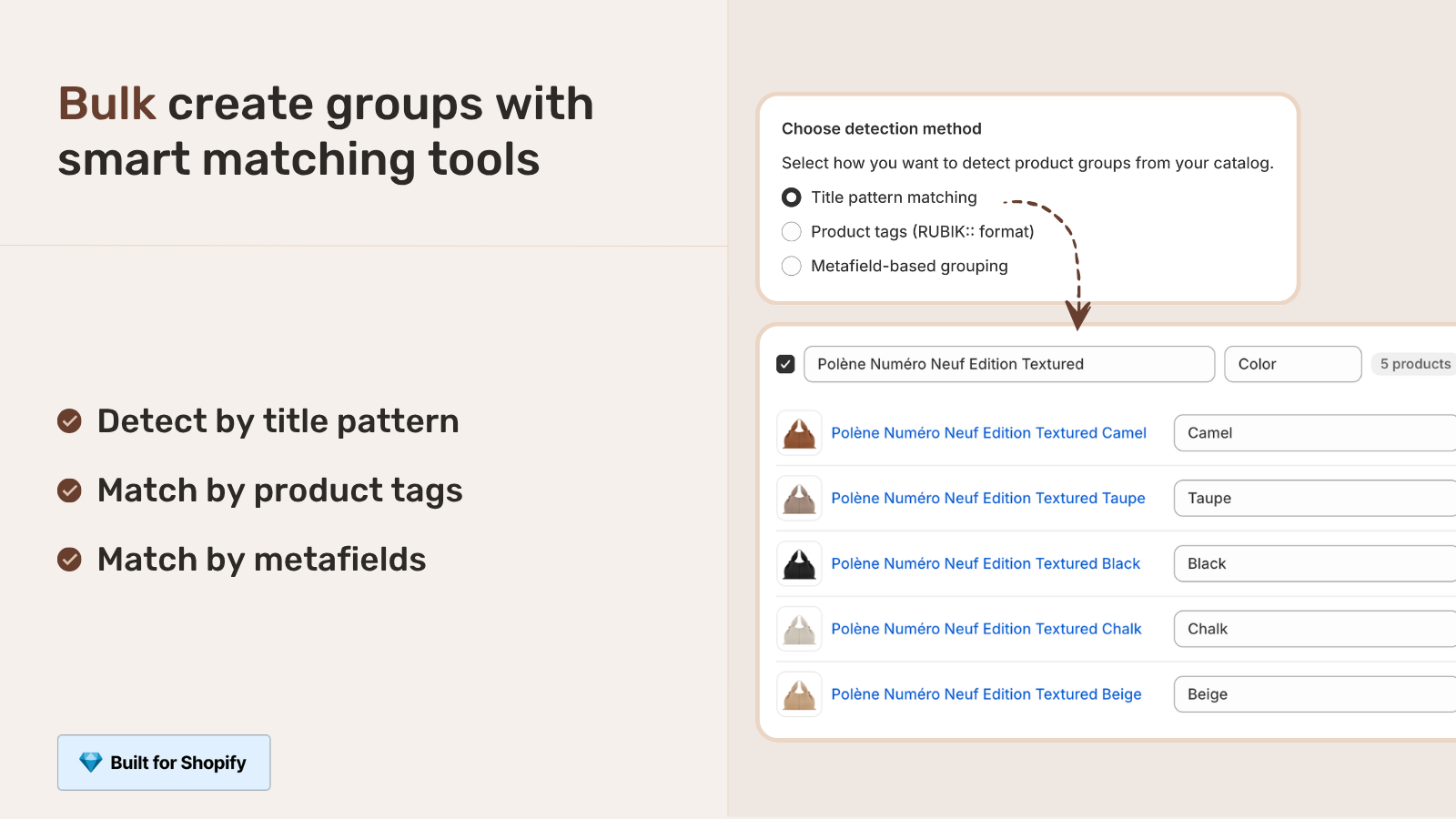
Yes. If you have hundreds of products to combine, Rubik Combined Listings has a bulk grouping tool that creates many groups in a single pass. It detects siblings automatically by title pattern, product tags, or metafields, so you don’t click through each family one at a time. Big catalogs get grouped in one run.
The three detection methods, briefly:
| Detection method | How it groups | Best when |
|---|---|---|
| Title pattern | Splits product titles on a separator or shared prefix or suffix | Your titles follow a pattern like “Aspen Hoodie, Green” |
| Product tags | Reads a structured RUBIK tag format you apply to products | You already tag products or want full control |
| Metafield | Groups by a shared metafield value across products | Your data lives in metafields from an import or PIM |
So if your existing products are named “Aspen Hoodie, Green” and “Aspen Hoodie, Sand”, the title pattern method splits on the comma, recognizes the shared prefix, and groups them for you. For a catalog imported from a supplier feed where every variation became its own product, this is the difference between an afternoon and ten minutes. Want the full walkthrough? See our bulk grouping guide and the deeper AI product grouping breakdown.
Is it variant images or combined listings you need?
It depends on how your products were built. If each color is a SEPARATE product, you need Rubik Combined Listings to link them. If all colors live as variants under ONE product and you just want the gallery to show the right photos, you need Rubik Variant Images. Plenty of stores run both.
| Your situation | The app | What it does |
|---|---|---|
| Each color is its own product | Rubik Combined Listings (ours) | Links them, adds swatches on collection and product pages, keeps unique URLs |
| All colors are variants of one product | Rubik Variant Images (ours) | Filters the product gallery per variant, plus product card swatches on the grid |
| Both (separate products AND messy galleries) | Both apps | Group with RCL, then show the right images per color with RVI |
This post is about the first row: products that already exist as separate listings. That’s the combined listings job. But if you find your real problem is messy product-page galleries, our friends over at Rubik Variant Images cover collection page swatches for a single product’s variants too. Not sure which side you’re on? The decision guide sorts it out fast.
If your colours are variants of one product rather than separate products, Rubik Variant Images assigns a separate image set to every variant instead. Free to install, 5.0 stars across 436 reviews.
Will combining listings hurt my SEO?
No, and this is the main reason to combine rather than merge. With Rubik Combined Listings, each grouped product keeps its own URL, title, meta tags, and images. Nothing gets deleted or redirected. So a color page that already ranks for “green aspen hoodie” keeps ranking, while shoppers still get one tidy swatch experience.
Think about the alternative. If you rebuilt 40 products into one multi-variant product, you’d kill 39 URLs. Every backlink, every indexed page, every bit of ranking those pages earned, gone. You’d 301 redirect them if you’re careful (most people aren’t), and you’d still lose the per-color long-tail traffic that distinct pages capture. Combining instead of merging dodges all of that. It’s the more SEO-friendly approach by a wide margin, which is the whole argument for doing combined listings without Shopify Plus.
The app is metafield-based with no external API calls, so the swatches load with the page and don’t add a render-blocking script to your storefront. For the deeper version of this argument, read our best practices guide and the collection page swatch display guide.
“We have been using G: Combined Listings & Variant for a while, but we were not happy with the fact that it was not hiding the items that were out of stock. So customers were getting confused a lot and ordering the wrong sizes. We found this app on Shopify App Store and decided to give a shot. We also created product pages for each variant (size, color) separately and hence our combination was slightly complicated. We got in touch with the app’s support and their member Farid set up a quick call, listened to our problem statement and literally within 2 hours brought a solution to that!!! That was unbelievably quick! Now we have a beautiful product page, as well as the collections page. Hence 5 star!”
Silkora, Netherlands, 2026-04-28, Rubik Combined Listings on the Shopify App Store
See it working on the live demo store, watch the tutorial video, or read the getting started guide. Comparing options first? Here’s our roundup of the best combined listings apps for 2026, plus a color swatch app comparison over on Craftshift.
Frequently asked questions
Which Shopify app should I use for combine existing products one listing?
Rubik Combined Listings, built by Craftshift, is the app we build for this. It holds 5.0 stars across 78 reviews and carries the Built for Shopify badge. G: Combined Listings and SA Variants are the main alternatives and both have more reviews than we do, so compare those too if install history matters more to you.
Can I merge two existing Shopify products into one?
You can’t literally merge two products in Shopify, and you usually shouldn’t want to. Merging would delete one product’s URL and images. Instead, link them with Rubik Combined Listings so they display as one listing with swatches while both products keep their own pages and SEO.
How do I combine separate color products into one listing on Shopify?
Install Rubik Combined Listings, create a group with the option name “Color”, add each color product through the picker, assign a swatch to each, and save. Shoppers then see one swatch row on both the collection and product pages, and clicking a swatch opens that color’s product page.
Do I need Shopify Plus to combine existing products?
No. Shopify’s native Combined Listings feature is limited to Plus, but Rubik Combined Listings works on every Shopify plan, including Basic and Shopify. It also bypasses the 100-variant-per-product limit without any Plus upgrade.
Will combining listings delete my products or change their URLs?
No. The app links products without modifying them. Every product keeps its URL, title, images, and inventory. The swatches are an added display layer, so nothing in your catalog gets deleted or redirected.
What happens to a combined swatch when a product goes out of stock?
It hides automatically. Rubik Combined Listings syncs in real time, so when a grouped product is out of stock, archived, or set to draft, its swatch disappears. Shoppers never click a swatch that leads to an unavailable color.
Can I combine hundreds of existing products without doing each one by hand?
Yes. The bulk grouping tool creates many groups at once by detecting siblings through title patterns, product tags, or metafields. A catalog where every color became its own product can be grouped in a single pass instead of one family at a time.
Is this the same as Rubik Variant Images?
No. Rubik Combined Listings links separate products into one listing. Rubik Variant Images filters the gallery of a single multi-variant product so each variant shows the right photos. If your colors are separate products, you want Combined Listings. Many stores run both apps together.