Quick answer: To make separate products act like variants in Shopify, the cause is that Shopify treats each product as its own URL with no native way to link them, so you install Rubik Combined Listings. It groups your separate products and renders swatches on the collection and product pages, so clicking a color jumps the shopper between products while each one keeps its own URL, title, and images.
So you’ve already built it the hard way. One product per color. Maybe one product per size. Each has its own listing, its own photos, its own SEO. And now they sit in your catalog like strangers who happen to share a last name. The shopper lands on the blue one and has no idea the red, green, and charcoal versions even exist. That’s the problem, right?
Picture a store with 6 colors of one hoodie, each saved as a separate product because you wanted clean URLs and unique images per shade. Native Shopify gives you nothing to tie them together on the storefront. No swatch row. No “also available in.” Nothing. We built Rubik Combined Listings precisely for this gap, and it’s one of the most common things merchants ask us about: my products are split, how do I make them feel like one?
One thing I want to be honest about up front. You don’t have to merge anything or rebuild your catalog. Your separate products stay separate (that’s the SEO win). You just add a linking layer on top so they behave, on the storefront, like variants of a single thing.
In this post
- Why Shopify can’t do this on its own
- What “acting like variants” actually looks like
- How do I link separate products so they work like variants?
- Is it variant images or combined listings you need?
- Will out-of-stock products still show up?
- Frequently asked questions
- Related reading
Why Shopify can’t do this on its own
Shopify can’t make separate products behave like variants natively because the platform models a “product” as a single entity with its own handle, URL, and option set, and there is no built-in field that says “this product is a sibling of that one.” Variants live inside one product. Separate products live nowhere near each other. That’s the whole limitation.
And it’s a real fork in the road for store owners. You can put every color inside one product as variants (clean grouping, but one shared URL and a 100-variant ceiling by default, and raising it requires Shopify’s Combined Listings / variants setup, not just adding more options), or you can split each color into its own product (great for SEO and unique imagery, but now they’re orphans on the storefront). Most merchants who land on this post already chose the split path. They made the right call for SEO and the wrong call for discoverability, and now they need a bridge.
Why doesn’t Shopify just ship a “related products as variants” toggle? Honestly, I don’t know. It’s the single most requested storefront behavior I see in this category, and it’s been missing for years. So third-party apps fill it. Ours is one of them.
What “acting like variants” actually looks like
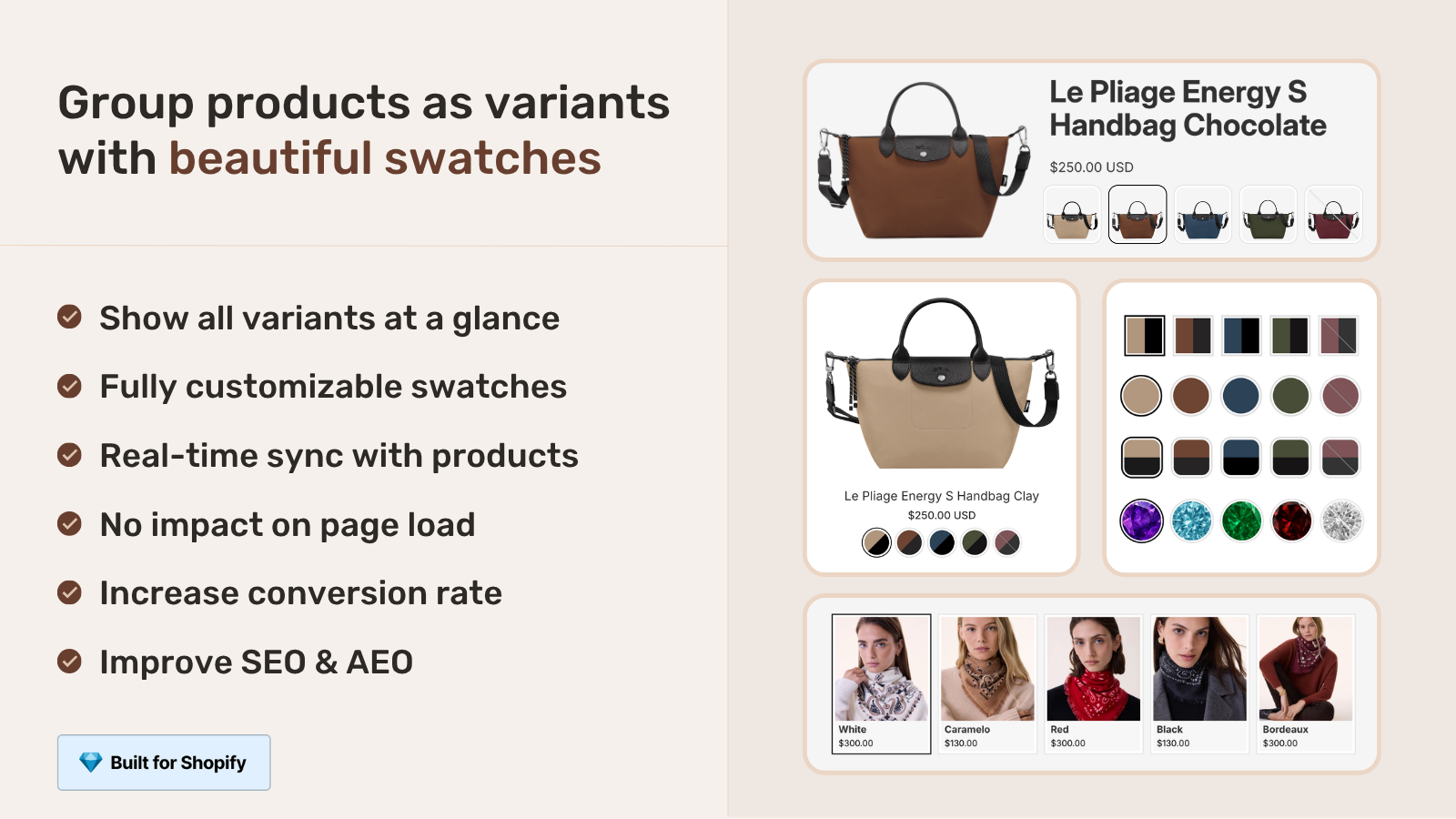
When separate products act like variants, a shopper sees a row of swatches on both the collection grid and the product page, and clicking one navigates to that product as if it were just another option. Same look as native variants. Different mechanics underneath. Each “variant” is a real product with its own page.
So instead of three lonely hoodie listings, the shopper gets one experience: pick blue, pick red, pick charcoal, and the storefront swaps the product behind the scenes. The price updates. The images update. The URL updates (good, because now each color is shareable and indexable). It reads as variants. It functions as linked products. That difference is invisible to the customer and very visible to Google.
How do I link separate products so they work like variants?
You link separate products with Rubik Combined Listings by creating a product group, assigning each product an option value (its color or size), and choosing a swatch style. The app then renders that group’s swatches on the collection and product pages automatically. No theme code. No merging. Here’s the flow we set up for most stores.
- Install Rubik Combined Listings from the App Store and open the app.
- Create a group. Pick the separate products that belong together (your 6 hoodie colors, say) in the resource picker.
- Name the option (Color, Size, Material) and give each product its option value. Got dozens of empties? Run AI Magic Fill, which reads each product’s image and title to fill the option value and hex color for you.
- Choose a swatch type: visual (image), button, pill, or dropdown. Tweak the look in the live preview, or just describe what you want to the AI Visual Assistant (“make the swatches bigger, pill-shaped”).
- Save. The swatches go live on the collection page and the product page. Click one and you’re carried to that product. Done.
Got hundreds of products? Don’t link them by hand. Use bulk grouping, which builds groups in one pass from your title pattern (it splits on a separator or detects a shared prefix), your product tags, or a metafield. We built the bulk flow because manually picking siblings across a 2,000-product catalog is the kind of task that eats an afternoon and your patience. If your titles already follow a pattern like “Aspen Hoodie, Olive” and “Aspen Hoodie, Charcoal,” the title detection groups them in seconds. For the full walkthrough, see our guide on AI product grouping.
Is it variant images or combined listings you need?
If your colors are separate products, you need Rubik Combined Listings. If your colors are variants inside one product and you just want the gallery to show the right photos, you need Rubik Variant Images. The two solve different halves of the same wall, and plenty of stores run both.
| Your situation | The fix | What you get |
|---|---|---|
| Each color is a SEPARATE product with its own URL | Rubik Combined Listings | Swatches link the products, unique URLs kept, bypasses the 100-variant limit |
| Colors are VARIANTS inside one product, wrong photos showing | Rubik Variant Images | Gallery filters to the selected variant’s media, plus product card swatches on the grid |
| Separate products AND you want clean per-variant images on each page | Both apps together | RCL links and routes, RVI shows the right media on each product page |
One thing I’ll push back on if you’ve read elsewhere that Variant Images is “product page only.” That’s outdated. Since late May 2026 it also drops swatches onto product cards across collection, search, and home listing pages, for the variants of a single product. But it still does not link separate products. That’s the line. Crossing it is the most common mix-up we untangle in support. For the deeper breakdown, read combined listings explained and our combined listings vs variants decision guide.
If your colours are variants of one product rather than separate products, Rubik Variant Images assigns a separate image set to every variant instead. Free to install, 5.0 stars across 436 reviews.
Will out-of-stock products still show up?
No. When a linked product goes out of stock, gets archived, or is set to draft, Rubik Combined Listings hides its swatch automatically in real time. There’s no nightly sync job and no stale cache, because the app reads live data through Shopify metaobject references each time the page loads.
This matters more than it sounds. With raw separate products and a hand-built “other colors” widget, a sold-out shade keeps showing until someone notices and removes it. Shoppers click it. They get confused. They order the wrong thing, or they bounce. The sync handles that for you, which is honestly the feature that turns “separate products acting like variants” from a fragile hack into something you can trust on a busy catalog.
“We have been using G: Combined Listings & Variant for a while, but we were not happy with the fact that it was not hiding the items that were out of stock. So customers were getting confused a lot and ordering the wrong sizes. We found this app on Shopify App Store and decided to give a shot. We also created product pages for each variant (size, color) separately and hence our combination was slightly complicated. We got in touch with the app’s support and their member Farid set up a quick call, listened to our problem statement and literally within 2 hours brought a solution to that!!! That was unbelievably quick! Now we have a beautiful product page, as well as the collections page. Hence 5 star!”
Silkora, Netherlands, 2026-04-28, Rubik Combined Listings on the Shopify App Store
And here’s the part people overlook: because each color stays a real product, you keep all the SEO you built. Separate indexable URLs. Unique titles. Distinct image alt text. You’re not collapsing six pages into one and throwing away rankings. You’re keeping six pages and stitching a storefront experience over them. That’s the whole pitch, and it’s why I think the split-product approach (linked with an app) beats stuffing everything into one product for stores that care about search. More on that in combined listings without Plus and collection page color swatches.
See it working before you commit. Browse the live demo store, watch the tutorial video, or read the getting started guide.
Frequently asked questions
Can I make separate products act like variants without merging them?
Yes. Rubik Combined Listings links your separate products into a group without merging or deleting anything. Each product keeps its own URL, title, and images. The app only adds a swatch layer on the storefront, so they behave like variants to shoppers while staying separate products in your admin.
How do I show one product as multiple variants when they’re really separate listings?
Group the listings in Rubik Combined Listings and assign each one an option value (its color or size). The app then renders swatches that switch between those products on the collection and product pages, so the customer sees one product with multiple options even though each option is a distinct listing.
Does linking separate products hurt my SEO?
No, it helps. Each linked product keeps its own indexable URL, title, and images, so you don’t lose the per-color pages you already rank for. Combined listings give you the unified storefront experience without collapsing several pages into one shared URL.
Do I need Shopify Plus to make separate products behave like variants?
No. Rubik Combined Listings works on any Shopify plan, and because it links separate products rather than stuffing them into one, it bypasses the native 100-variant-per-product limit without Plus. That’s a big reason large catalogs use it.
What happens when one of the linked products sells out?
Its swatch is hidden automatically. Rubik Combined Listings reads live inventory through Shopify metaobject references, so out-of-stock, archived, or draft products drop out of the swatch row in real time. No manual cleanup and no stale options confusing shoppers.
Can I group hundreds of separate products at once?
Yes. Bulk grouping creates many groups in one pass using your title pattern, product tags, or a metafield. If your product titles share a prefix or use a consistent separator, the app detects the siblings and groups them without you picking each one by hand.
Is this the same as Rubik Variant Images?
No. Rubik Variant Images handles variants inside one product, filtering the gallery so the selected variant’s photos show. Rubik Combined Listings links separate products together. If your colors are separate listings, you want Combined Listings. Many stores run both apps.
Will the swatches show on collection pages too, or only the product page?
Both. Rubik Combined Listings renders swatches on collection and search grids as well as on the grouped product pages. A shopper can pick a color from the collection grid and land on the right product without opening a page first.